Introduction to the process model
An Ormuz process is a typed sequence of steps that applies a merchant's rules and produces an observable outcome. It accumulates state during execution, can branch according to conditions, and can suspend to wait for human action or an external signal before resuming.
What a process is
A process is the executable form of business logic. Instead of coding a sequence of API calls in your system, you describe steps and connections in Ormuz. The platform executes them, maintains state, emits events on significant transitions, and exposes the result through its public object model.
Process steps do not all execute at once. They progress according to connections you define: a node starts only when its predecessors have produced their outputs. Some nodes may decide not to continue to certain branches, allowing conditional journeys without routing code in your system.
This page introduces the essential concepts. The complete reference — execution, advanced bindings, timers, idempotency — is in the Orchestration.
Definitions and instances
An Ormuz process distinguishes two levels: the definition and the instance.
The definition is the reusable schema. It describes nodes, their connections, the expected input schema, and typed variables accumulated during execution. A definition can be modified and then published as a new revision. Instances created after publication use the active revision.
An instance is one concrete execution of a published revision. It is created by a trigger — API call, platform event, or timer — and progresses node by node until every active path reaches an end. Several instances of the same definition may execute in parallel without interfering.
A definition is published as a revision. Every trigger creates an independent instance of that revision.
Node families
A node is a composable capability. It receives typed inputs, performs an operation, and produces typed outputs usable by following nodes. Five families cover orchestration needs.
| Family | Role | Examples |
|---|---|---|
| Helpers | Perform an atomic action: load an object, create an entity, check a condition, update a status, send an email. | fetch_company, create_buyer, credit.check_credit_availability, reconcile_payment |
| Routers | Evaluate a business result and select a named output branch. Each route is a distinct connection to a following node. | resolve_contact (found / not_found), credit.check_credit_availability (approved / declined) |
| User actions | Open a User Journey and put the instance into waiting until a user completes the step. The response feeds following nodes like any other output. | collect_user_email, collect_choice, sirene.search_sirene_company, stripe.collect_sepa_debit_mandate |
| Integrations | Call an external provider — PSP, ERP, accounting, open banking — and return typed objects or statuses to the rest of the process. | stripe.ensure_customer, stripe.trigger_sepa_debit, stripe.create_bank_transfer_payment_intent |
| Subworkflows | Delegate part of the journey to another process definition. The parent process waits for subprocess completion before continuing. | subworkflow (configures target definition and inputs) |
The Core node catalog documents native Ormuz nodes. Nodes installed with an extension are available in the Integrations.
Inputs, outputs, and bindings
Each node declares its inputs — values it expects — and its outputs
— values it produces. Types cover scalars (string, integer,
boolean, datetime), platform objects (platform.company,
platform.checkout_session, etc.), arrays, and object drafts awaiting creation.
A binding connects the output of one node to the input of a following node. For example, the create_buyer node produces a platform.company object. That same object can be wired directly as input to the resolve_contact node, which also expects a
platform.company. There is no need to manipulate an identifier or write code to pass this object.
The `company` output of the first node becomes the `company` input of the next through a typed binding. The type is checked in the definition.
An input may also be bound to global process input, a static value, or a process variable accumulated by an earlier node. The Inputs, outputs, and bindings page describes every available binding form; calculations are detailed in Expressions.
Routes and branches
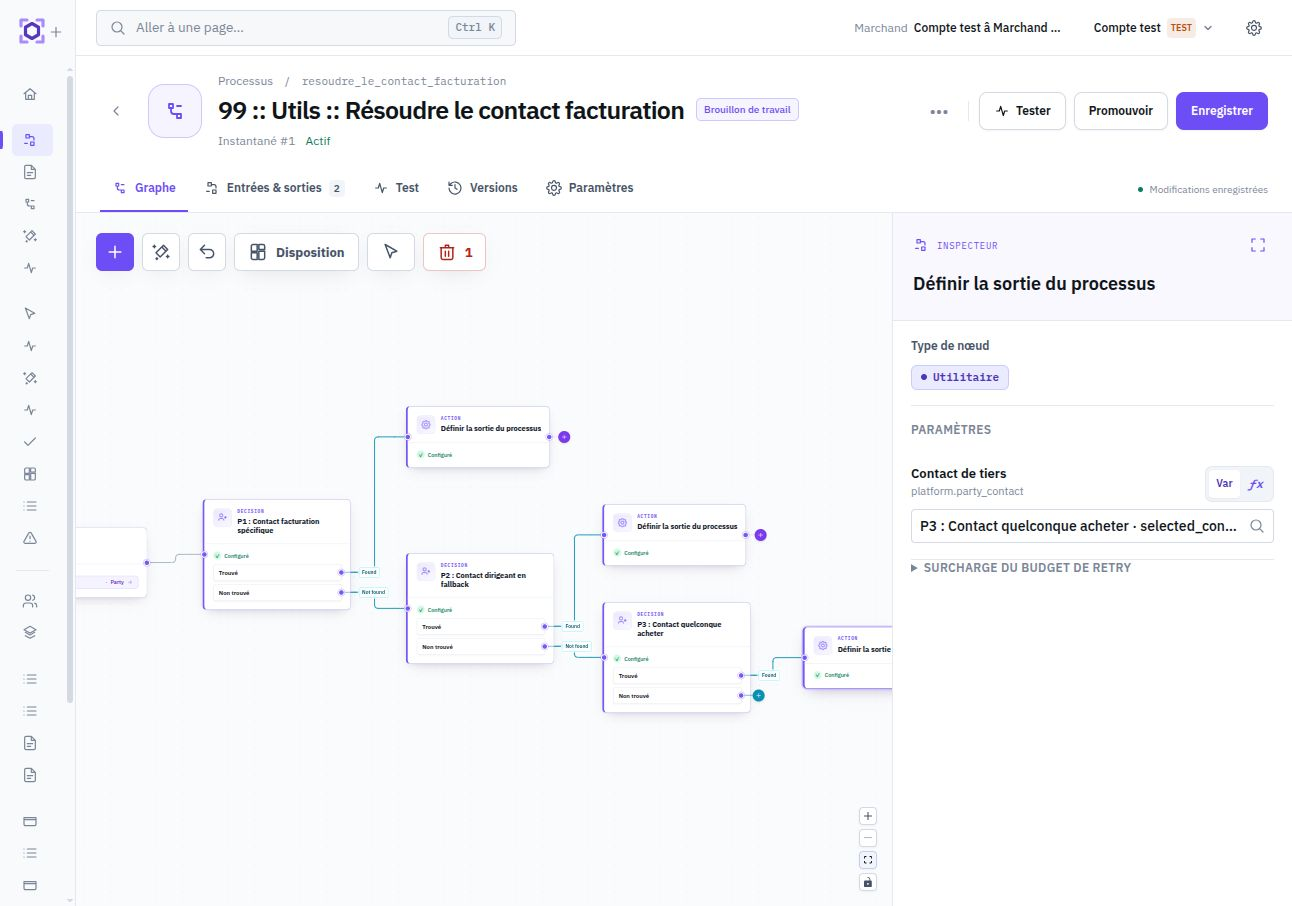
Nodes in the Routers family and some User actions expose named outputs called routes. Instead of one outbound connection, these nodes offer several — one for each possible outcome — and select exactly one at runtime according to the result.
Nodes on an unselected branch move to skipped and execute nothing. Several branches may converge on one downstream node: it simply waits for an active branch to complete the predecessor node.
The router selects the `found` or `not_found` route according to the resolution result. Both branches then converge on the finalization node.
Triggers
An instance is created by one of the following three trigger types.
Three sources can create an instance: direct API call, platform event, or timer.
API call — your system directly calls the Ormuz API to create an instance with the definition's required inputs.
Platform event — an event emitted by Ormuz — object creation, status change, provider-webhook receipt — automatically triggers processes subscribed to that event type.
Timer — a process runs on a recurring schedule or after a delay, scanning eligible objects and creating one instance per relevant object.
Human interactions
A User action node opens a User Journey hosted by Ormuz — an interactive page accessible from your product — and puts the instance into waiting state. Execution automatically resumes when the user completes the requested step.
User responses — email, name, choice, form data, mandate — become node outputs and feed following nodes exactly like a helper would. The process does not distinguish where a value came from — API call, provider, or user.
The User Journeys page explains how to integrate these interactions into your product and customize their appearance.
Execution states
Every node in an instance has a state that evolves during execution. The instance itself is observable from the Console and API through its process_instance.
| State | Meaning |
|---|---|
pending | Waiting for all predecessors to complete. |
running | Currently executing. |
completed | Completed successfully. Outputs are available to following nodes. |
waiting | Paused on a user action or external signal. The instance remains active. |
skipped | Not selected by the router of the active branch. No effect on execution. |
An instance remains active as long as at least one node is in running or waiting state. It is considered complete when all nodes on active branches reach completed or skipped.
The state of every node and the instance history are available in real time from the Console and API. The Observability page explains how to monitor and diagnose an instance.