Observability
The Console first presents the operational situation of an instance: what it is running, what it is waiting for, what needs intervention, and the latest recorded activity. Chronology, graph, data, and history then let you inspect evidence at the appropriate depth.
Operations is the entry point
The Operations tab answers immediate questions without requiring graph traversal: overall state, active waits, known next resume, warnings, execution context, and recent activity. Several branches may be active in parallel; each remains visible as a distinct item.
A normal wait — participant, event, timer, Agent Run, External Task, or child process — remains distinct from failure. The Console does not invent a progress percentage when the process may branch or execute several paths in parallel.
The operational situation leads to chronology or graph; the inspector then preserves the context of the selected element.
When a process test creates a real instance, the test workspace reuses the same execution states and graph. Test diagnosis and operational observability therefore use the same language.
Chronology and graph describe the same execution
The Execution tab offers two complementary views. Chronology lists recorded execution occurrences with status, timestamps, duration when known, warnings, and errors. The graph shows paths, branches, and process dependencies.
Selection is preserved when switching views. A recorded iteration or attempt can therefore be inspected precisely without being confused with the node's current state.
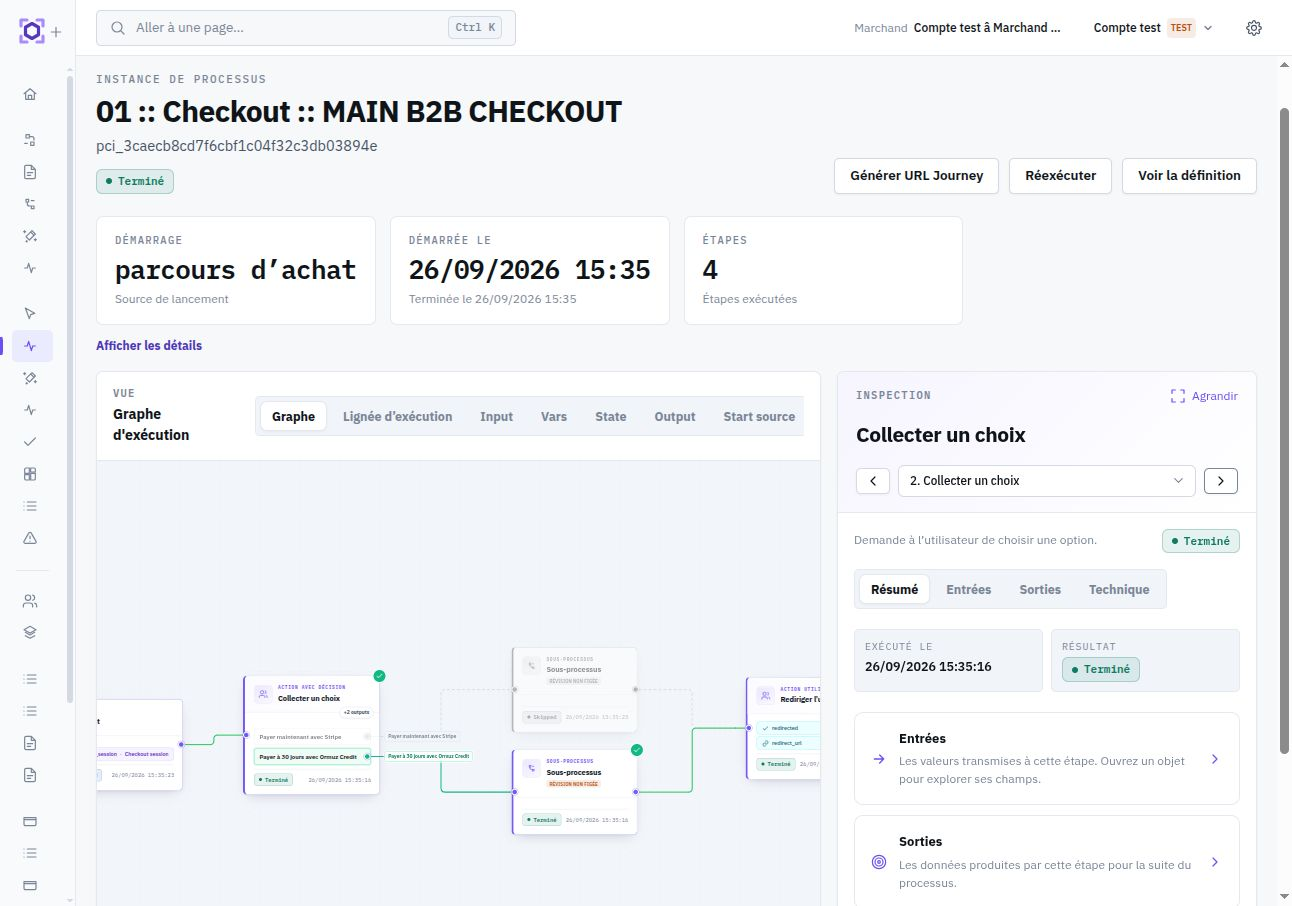
Inspect a current node or recorded occurrence
The inspector is shared across Operations, chronology, and graph. It exposes a summary, inputs, outputs, and available technical information, plus links to specialized details when the step delegates execution.
Selecting an occurrence in chronology shows data recorded for that occurrence. Selecting a node in the graph shows its current state. This prevents attributing a later attempt's output or error to an earlier attempt.
| State | Operational reading |
|---|---|
running | Execution is currently progressing. |
waiting | An external condition, interaction, or deadline is awaited. |
completed | The occurrence completed and its recorded outputs are available. |
failed | The occurrence did not complete according to the expected contract. |
skipped | This occurrence was skipped according to the applicable path or decision. |
Current data, interventions, and lineage
The Data tab presents current instance values: input, variables, state, output, and trigger source. Values captured for a historical occurrence are read from that occurrence's inspector so current and past state are not mixed.
History & control separates auditable interventions from execution lineage. Lineage notably shows parent, child, retry, and fork instances. Intervention history is subject to audit rights; if unavailable, accessible lineage can still be inspected.
Understand the effect of an operator action
Available actions depend on instance state and the user's effective permissions. They are revalidated at execution time: if the instance changed between display and confirmation, the Console refreshes the situation instead of applying an action to stale state.
- Retry creates a new instance from the beginning with the same inputs on the current Working revision.
- Run again also creates a new independent execution from the beginning on the current Working revision.
- Fork creates a new instance from a selected resume point while preserving the revision executed by the source instance; descendants of the resume point may be replayed.
- Stop requests instance stop; no new step starts once stopping takes effect.
A new execution or fork may replay steps with external effects. Check the resume point and idempotency guarantees before confirming the action.
Child Runs and execution boundaries
Some nodes open a specialized execution. An Agent task creates an Agent Run, a subworkflow opens a child instance, and an External Task creates a delegated-work occurrence with its own attempt history. The process view preserves a summary and lets you drill into specialized detail when investigation requires it.
This hierarchy avoids copying the entire child execution into the parent. The instance shows what is needed to understand orchestration; the specialized view retains detail for its own execution boundary.
Warnings: succeed with a diagnostic
A warning is an observable condition worth attention without automatically making execution invalid. It is attached to the execution that produced it, distinguishing nominal success from success accompanied by an anomaly or fallback mechanism.
A node or Run can complete successfully while carrying a warning. An error prevents execution from satisfying its contract and leads to the applicable failure or retry handling.
Warnings cross execution boundaries in a controlled way. Warnings produced by Agent tools are visible in the Agent Run and may be summarized on the parent node. For a subprocess or an foreach, the parent may surface a summary directing investigation to the relevant execution.
Protected data and targeted reveal
Inputs, outputs, and contexts remain subject to sensitive and secret classifications. Relevant values are masked in general views; their presence remains visible to preserve useful diagnosis.
When one precise persisted value must be inspected, the Console offers targeted reveal subject to the required right and reason. The value is shown temporarily in a dedicated window. A historical occurrence does not become a clear-text archive: reveal remains bounded to values the platform can authorize and trace.
See Controlled reveal for the complete contract.
Diagnose a failure
Start from the operational situation, then open the relevant occurrence. This progression avoids inferring the cause from global status alone and preserves the data from the attempt actually being examined.
- Identify the failure or active wait in Operations.
- Open the occurrence in chronology or locate the node in the graph.
- Check its recorded inputs, outputs, error, and warnings.
- Open the Agent Run, child instance, or External Task when deeper diagnostics are available.
- Use reveal only for the protected value genuinely required by the investigation.
How Ormuz resumes execution and avoids repeating effects is documented in Errors, retries, and idempotency.